7 Latest Illustrations How To - Free illustrations, backgrounds and illustrator templates in eps and ai formats. How to use illustration in a sentence. Text on cartoon illustrations . Transform photos into watercolors with a free. Illustrations how to 7 Successful Illustrations How To . Illustrations images photos vector graphics illustrations videos. On pixiv how to draw page, you can easily find drawing tutorials, step by step drawings, textures and other materials. There are many types of. Illustrations how to 500+ free illustrations & animations. How to make flat illustrations original and add personal style to them today, many designers try their creativity in flat illustration. Suggestive illustrations on the gospel of john: Illustrations how to The meaning of illustration is something that serves to illustrate. Adobe.com has been visited by 100k+ users in the past month Attract more visitors and increase your conversion rate with custom made illustrati...
8 Cool How To Upload Pictures To Pinterest - If prompted to get the pinterest browser button, click not now and then click. Create pin on mobile apps (android & ios) step 1:
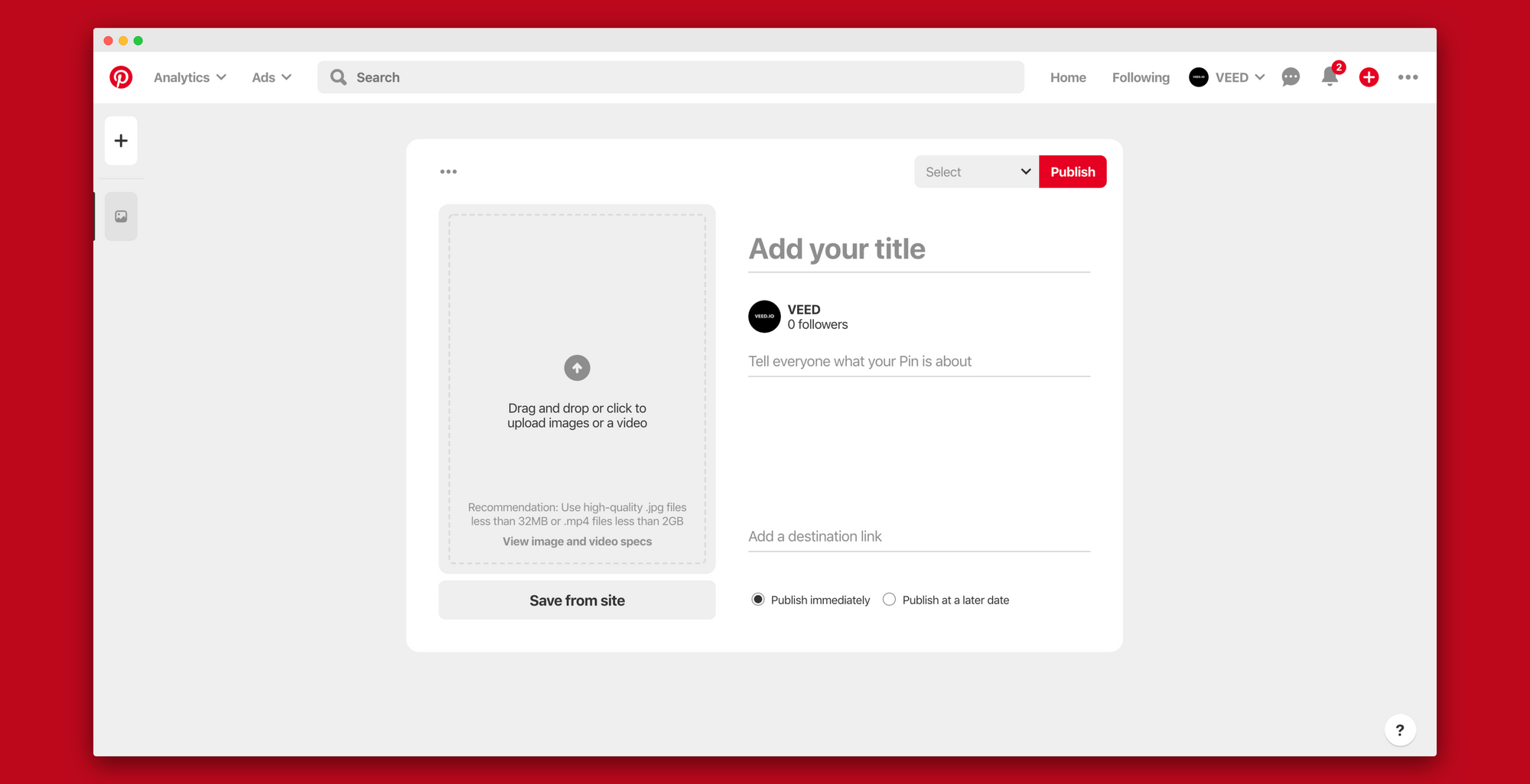 How to upload a video to Pinterest . It’s the best platform where you can post your images, gifs, etc (these are often called “pins”).
How to upload pictures to pinterest

10 Expert How To Upload Pictures To Pinterest. Click on “choose file” and select the image file you want to upload. Manually upload pictures to pinterest here’s how to create own pins for both regular users and business account. You will find this option in. How to upload pictures to pinterest
Log in with your pinterest account. I saw your helpful tutorial on how to pin a favorite photo on pinterest from the web but am wondering if you can explain how. Choose to add a pin. How to upload pictures to pinterest
Note that it could possibly take. Add a title, description and destination website, then tap next. ==> i have discussed more in detail in my blog post with over 27 tips on designing pinterest images. How to upload pictures to pinterest
How to create pins that go viral. The next screen will pop up to upload your video and they’ve given all the right specs needed to the right of the upload box. But you can upload by sharing your picture to pinterest from your gallery. How to upload pictures to pinterest
Make sure that you write the title to tell what your blog is about. Here are the steps to do; Open up your pinterest account and click on the ‘+’ sign in the upper right of the screen to then click “create pin”. How to upload pictures to pinterest
Tap your profile picture to open your profile. To learn how to upload a video to pinterest, all you got to do is follow these steps: Log in to your pinterest account and click on the white circle with a plus in it. How to upload pictures to pinterest
Recommended colors and types of images that get more engagement on pinterest. Here's a quick guide on how to best upload and edit images. Select a photo to upload or tap the media camera How to upload pictures to pinterest
Learn how to upload multiple pictures on pinterest on mobile. Select a photo to upload or tap the media camera icon to take a photo, and then tap next. Open the pinterest app on your device and log into your pinterest account. How to upload pictures to pinterest
Bulk uploading to pinterest has never been easier on the pinterest website, but it can be difficult to find how to do it unless you're told first. Here’s how to post on pinterest using your android phone: How to pin to pinterest from your own pictures on your computer want to share with the world your own pictures that you yourself have taken? How to upload pictures to pinterest
How to post on pinterest: Open the pinterest app and tap. Log in and authorize bulk pinner to upload to your pinterest account. How to upload pictures to pinterest
Tap your profile picture to open your profile. 23 best free image sharing sites to use in 2022. If it’s not on your computer, you should probably not be trying to upload it. How to upload pictures to pinterest
Open pinterest (भ रत / india) and on your upper right find your name and click on it. How to upload photos on pinterest (with pictures) this wikihow teaches you how to add (or pin) a photo from your computer, smartphone, or tablet to one of your pinterest boards. Open the pinterest app tap your profile picture at the bottom of the screen tap the plus icon at the top right corner of your pinterest page select create a pin select the image you want to use from your camera roll, or tap the camera icon to take a new picture. How to upload pictures to pinterest
How to upload photos on pinterest (with pictures) this wikihow teaches you how to add (or pin) a photo from your computer, smartphone, or tablet to one of your pinterest boards. Then select the upload a pin option. The first step is to identify the photo or other graphic that you’d like to pin from your own computer. How to upload pictures to pinterest
Just upload the image you recently designed. Once it land to your profile page you will find a + icon, which have two options “create board” and “create pin”.choose create pin Open the pinterest app on your device and log into your pinterest account. How to upload pictures to pinterest
Alternatively, you can also launch its mobile app and access your pinterest account. How to upload a pin. Steps to add pictures to pinterest app: How to upload pictures to pinterest
Unless you’re hiding under the rocks for the last few years, you might have already heard about pinterest. Uploading multiple pictures on pinterest is a great feature and saves a lot of time. Maybe you don't know the new version of pinterest of android doesn't even have the option that you can use to upload pictures by link. How to upload pictures to pinterest
 How to upload to Pinterest كيف ترفع الصور على موقع YouTube . Maybe you don't know the new version of pinterest of android doesn't even have the option that you can use to upload pictures by link.
 How to upload a video to Pinterest . Uploading multiple pictures on pinterest is a great feature and saves a lot of time.
 How to Upload Video to Pinterest Simple Pin Media . Unless you’re hiding under the rocks for the last few years, you might have already heard about pinterest.
 How to Post UPLOAD a Pinterest Pin YouTube . Steps to add pictures to pinterest app:
 How to Upload Photos on Pinterest (with Pictures) wikiHow . How to upload a pin.
 How to Upload Your YouTube Videos to Pinterest YouTube . Alternatively, you can also launch its mobile app and access your pinterest account.

 How to Upload Photos on Pinterest (with Pictures) wikiHow . Once it land to your profile page you will find a + icon, which have two options “create board” and “create pin”.choose create pin
 How to upload a video to Pinterest . Just upload the image you recently designed.

Comments
Post a Comment