7 Latest Illustrations How To - Free illustrations, backgrounds and illustrator templates in eps and ai formats. How to use illustration in a sentence. Text on cartoon illustrations . Transform photos into watercolors with a free. Illustrations how to 7 Successful Illustrations How To . Illustrations images photos vector graphics illustrations videos. On pixiv how to draw page, you can easily find drawing tutorials, step by step drawings, textures and other materials. There are many types of. Illustrations how to 500+ free illustrations & animations. How to make flat illustrations original and add personal style to them today, many designers try their creativity in flat illustration. Suggestive illustrations on the gospel of john: Illustrations how to The meaning of illustration is something that serves to illustrate. Adobe.com has been visited by 100k+ users in the past month Attract more visitors and increase your conversion rate with custom made illustrati...
10 Strategy How To Set Google As Search Engine - In order to change the default search engine or the order of search engines in the top right search box in firefox, please perform the following steps: Google search is installed but not set as your default search provider.
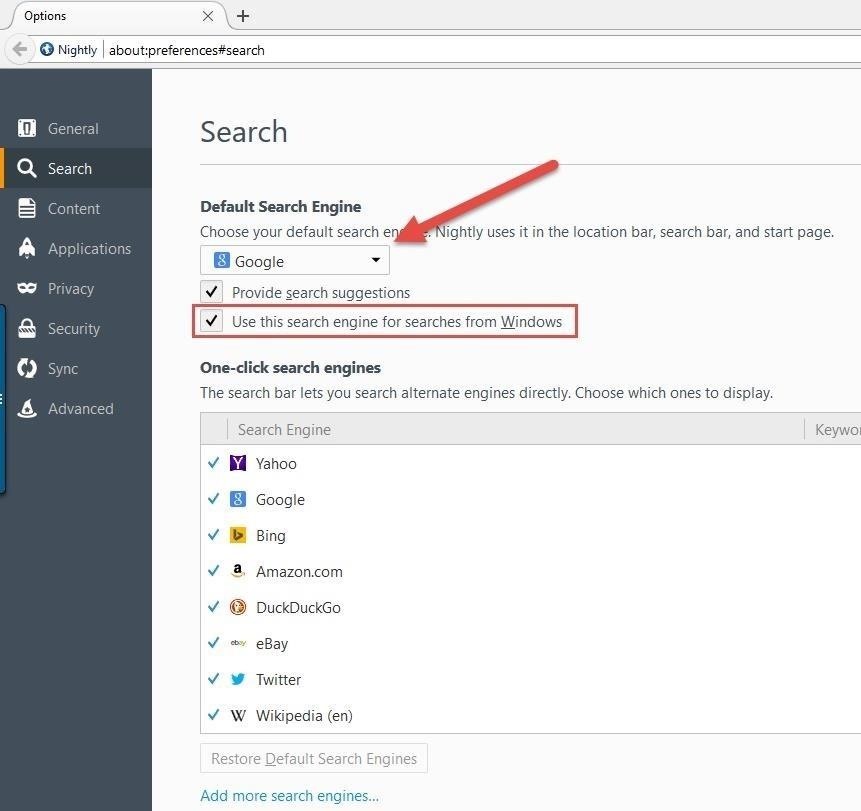 How to Set Google as the Default Search Engine for the . Start searching right from your address bar today.
How to set google as search engine
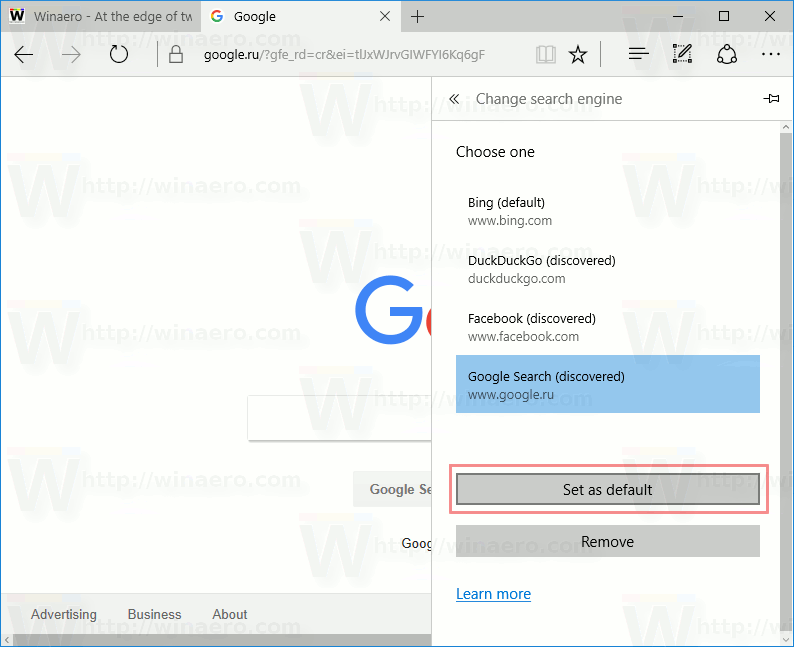
9 Sly How To Set Google As Search Engine. Click on the menu on the top right corner and go to settings. You can use the address bar (omnibox) as a search box. Windows 11 does not allow you to set a default search engine systemwide across all browsers, for example. How to set google as search engine
Under set your homepage, click the down arrow a specific page or pages. If you want to make sure all your web searches are done through google, you. Google search is installed but not set as your default search provider. How to set google as search engine
Click on the three dots in the top right corner of the browser window, then click on 'settings' go down to the bottom and click 'view advanced settings' scroll down until you see ' search in the address bar with', click on it and select 'add new' then click on google and select 'add as default ' This tutorial is show u how to change google as default search engine in google chrome. In the upper right corner of your browser, select more settings. How to set google as search engine
To get results from google each time you search, you can make google your default search engine. If you have a current homepage: If you want to use microsoft edge but not bing as your search engine, in this video i show you how to change the default search engine to google. How to set google as search engine
By default, microsoft edge uses bing as its default search engine, but if you prefer something else—such as google or duckduckgo—you can change it easily in the settings menu. Change your homepage to google. 0:00 intro0:10 google chrome (desktop)0:33 google chrome (mobile, iphone)1:00 safari (desktop)1:13 safari (mobile, iphone)1:36 firefox (desktop)2:02 firefox. How to set google as search engine
To default to google, here’s how you do it: To default to google, here’s how you do it: If you prefer the results you get from google's search engine, it'll be easy to make google search the default. How to set google as search engine
Windows 11 doesn’t let you set a default search engine systemwide across all browsers, however. Even though google is the most popular search engine, some web browsers still don't automatically set it as the default. How to set google as your default search engine instead of bing if you'd rather use google for your searches in windows 11, we can walk you through the process of changing search. How to set google as search engine
Here’s how, whether you’re running edge on windows 10, windows 11, or mac. #if you would like to select another search engine. #move the mouse cursor inside the search box at the top right of the firefox window and click the down arrow next to the provider's logo. How to set google as search engine
I have some problem yesterday when yahoo is always be my default sear Google search is installed but not set as your default search provider. To default to google, here’s how you do it: How to set google as search engine
Start searching right from your address bar today. Start searching right from your address bar today. If your browser isn’t listed below, check its help. How to set google as search engine
Click the tools icon at the far right. If you notice unexpected changes in. In the general tab, find the search section and click settings. How to set google as search engine
Make google your default search engine. How do i set google as my default search engine in windows 10? Next to the url, click x. How to set google as search engine
If you prefer the results you get from google’s search engine, it’s easy enough to make google search the default. It automatically uses google, but you can set another default search engine instead. How to set google as search engine

 How to Set Google as Default Search Engine on Chrome, Edge . If you prefer the results you get from google’s search engine, it’s easy enough to make google search the default.
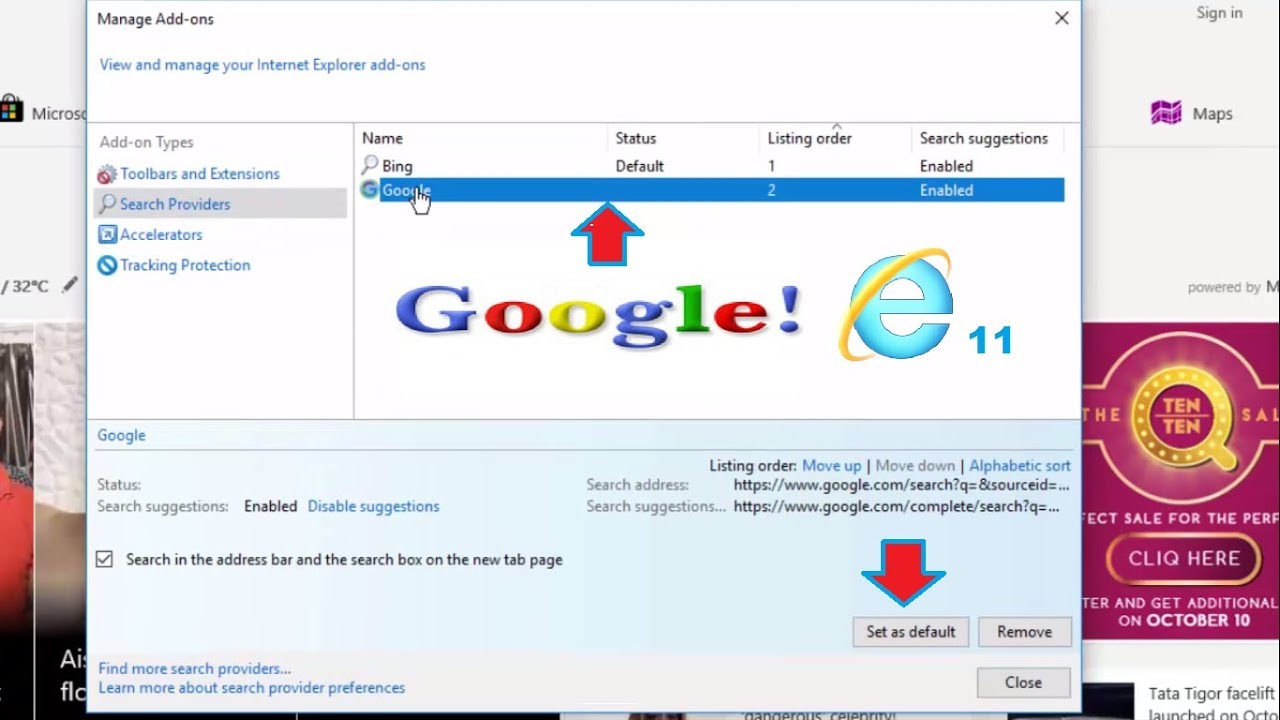 How to Set Google as Default Search Engine in . Next to the url, click x.
 How to Change the Firefox’s Default Search Engine Back to . How do i set google as my default search engine in windows 10?
 Set Google as your default search engine in Microsoft Edge . Make google your default search engine.
 How To Change the Default Search Engine in Windows 8’s . In the general tab, find the search section and click settings.


 Make Google your default search provider Google . If your browser isn’t listed below, check its help.

Comments
Post a Comment