7 Latest Illustrations How To - Free illustrations, backgrounds and illustrator templates in eps and ai formats. How to use illustration in a sentence. Text on cartoon illustrations . Transform photos into watercolors with a free. Illustrations how to 7 Successful Illustrations How To . Illustrations images photos vector graphics illustrations videos. On pixiv how to draw page, you can easily find drawing tutorials, step by step drawings, textures and other materials. There are many types of. Illustrations how to 500+ free illustrations & animations. How to make flat illustrations original and add personal style to them today, many designers try their creativity in flat illustration. Suggestive illustrations on the gospel of john: Illustrations how to The meaning of illustration is something that serves to illustrate. Adobe.com has been visited by 100k+ users in the past month Attract more visitors and increase your conversion rate with custom made illustrati...
9 Useful How To Do Subscripts On Google Docs - Sometimes you have to use subscripts and superscripts frequently while you are working on a document. There are three ways you can add subscripts in google docs.
 How to Do Subscript and Superscript in Google Docs? . How to do subscript in google docs.
How to do subscripts on google docs
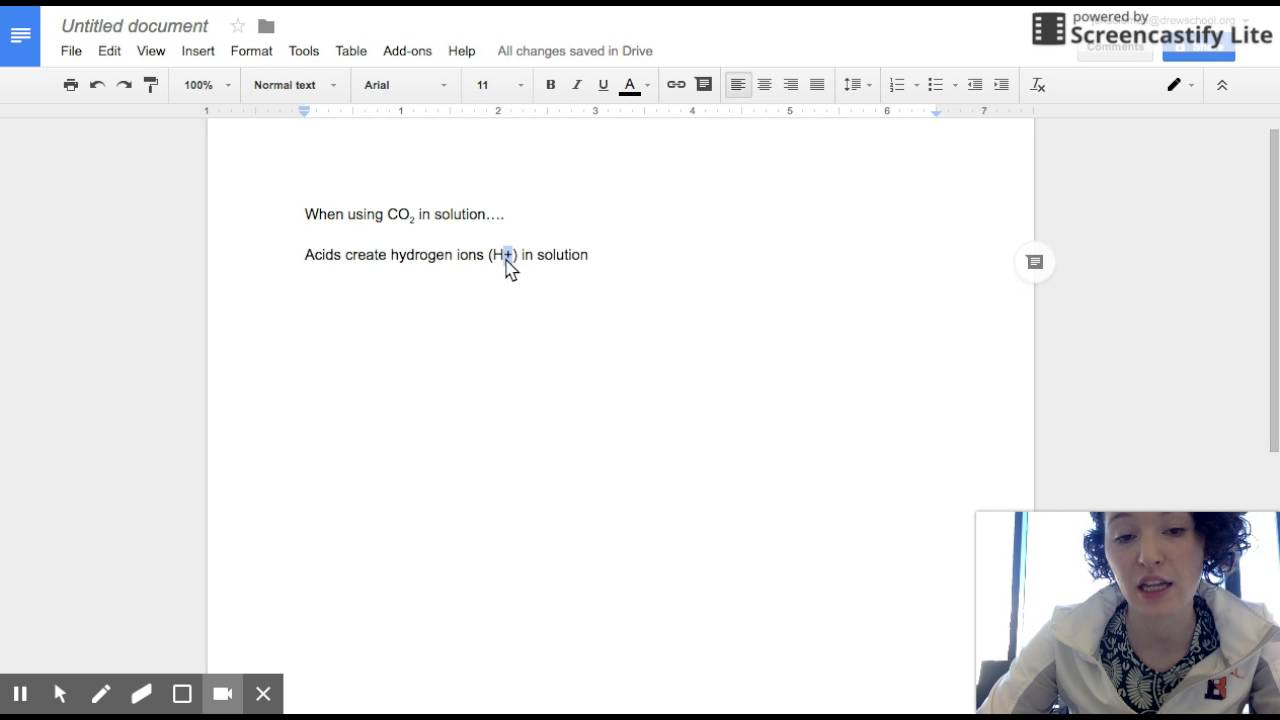
13 Effortless How To Do Subscripts On Google Docs. With google docs you can create google sheets ( similar to excel sheet), google forms (same ms access), and google slides (just as ms powerpoint presentation). As i was recently writing a piece on how to superscript in google docs which went into a bit more detail about this specific feature than our big list of google docs hotkeys article, i thought it might be nice to share the instructions on how to do “subscript” in google’s market leading word processing and collaborative document preparation tool! Discover how to publish in How to do subscripts on google docs
Press command + comma ( ⌘ + ,). Its submitted by organization in the best. To use it effectively, though, you need to use subscripts and superscripts. How to do subscripts on google docs
You can remove subscript, by selecting the text, character, number or symbol with the subscript you want to remove and then using the same keyboard shortcut. The term subscript refers to characters that are positioned below the standard type line. Read morehow to do subscript. How to do subscripts on google docs
How can i insert superscripts and subscripts into google forms? Docs editors back 9/20/13 original poster adamchem subscript in google forms 1 recommended answer how do i type sub/superscripts into a multiple choice question in a google form? In google docs, there are three ways you can do subscript and superscript in google docs. How to do subscripts on google docs
To open a list of keyboard shortcuts in go Here are a number of highest rated how to do subscript in google docs pictures on internet. Google docs is very useful for writing different kinds of data, from mathematical and chemical formulas to citations. How to do subscripts on google docs
How to use google docs: So get ready to insert those footnotes, exponents, or other textual goodies! So, if you have google docs sign in and now you want to prepare data with formulas and cite data, that requires to enter information with subscript data. How to do subscripts on google docs
Need this to set chemistry questions i tried to import the subscript or superscript characters from google docs but to no avail. Sometimes words in your google docs need small letters or numbers at the bottom (subscript), especially for chemical formulas, mathematical text, or simple things like dates. But since there are no keyboard shortcuts, you'll have to rely on the format menu to do. How to do subscripts on google docs
I have updated the spreadsheet to include a few more symbols which are useful for. Summarizing —> how to do subscript and superscript in google docs in this post, we sat around to discuss how we can add subscripts and superscripts; And it’s understandable since google sheets was built to work with numbers and is not a word How to do subscripts on google docs
Basic tutorial, plus tips and tricks here’s how. For example, i would like to change. How to properly create and edit chemical equations and formulas in google docs How to do subscripts on google docs
Professional copywriter kim siever shows you how to superscript your text in google docs.==================sign up for weekly grammar and social media tips a. We'll show you how to do both subscript and superscript in google docs. The best way to do this is to use keyboard shortcuts. How to do subscripts on google docs
Using subscripts and superscripts is fairly easy on google docs, but this feature has not yet been implemented on google sheets. Ch4 still looks like ch4 without the ,. In our documents in google docs. How to do subscripts on google docs
Here is the link to my subscript/superscript spreadsheet. One is using the menu system, the other is by using keyboard shortcuts, and the last is using the special characters chart. Google docs is very useful for writing different kinds of data, from mathematical and chemical formulas to citations. How to do subscripts on google docs
For example, you’ll need to use subscript to write the molecular formula of water, h20. Discover how to publish in Use keyboard shortcuts in google docs to navigate, format, and edit. How to do subscripts on google docs
In the google docs document, select the text character, number or symbol to which you want to apply superscript. Like the web version, the google docs mobile app also allows you to format text as superscript or subscript. Adding subscripts and superscripts is essential when typing various types of documents. How to do subscripts on google docs
Some shortcuts might not work for all languages or keyboards. You can make your own copy to your google drive, and then copy/paste the subscripts/superscripts you need. It is very important while writing technical papers and/or professional documents, in writing chemical and mathematical equations, etc. How to do subscripts on google docs
To use it effectively, though, you need to use subscripts and superscripts. A maker at heart, michael loves all things diy. How to do subscripts on google docs
 How to do Subscript in Google Docs Job Wherever . A maker at heart, michael loves all things diy.
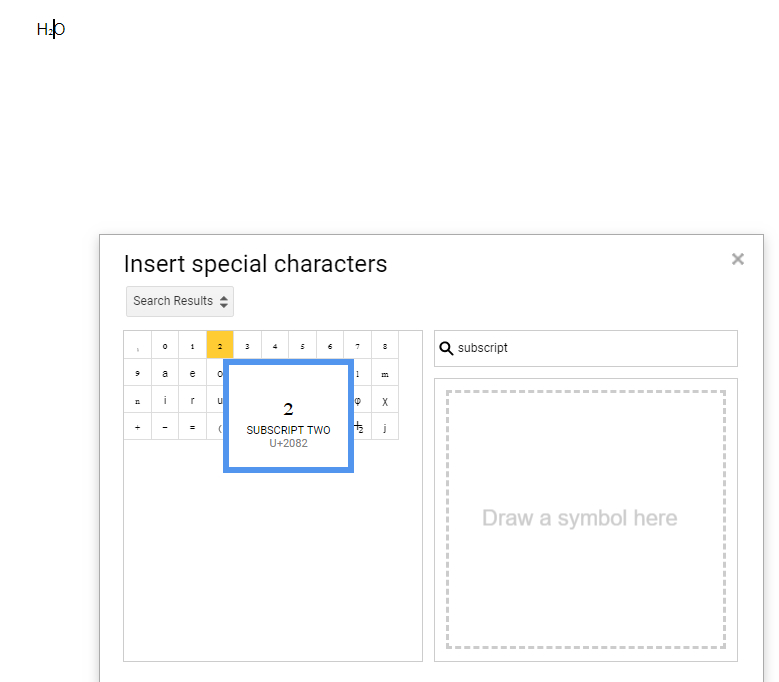 How to subscript in Google Docs Silicon Dales . To use it effectively, though, you need to use subscripts and superscripts.
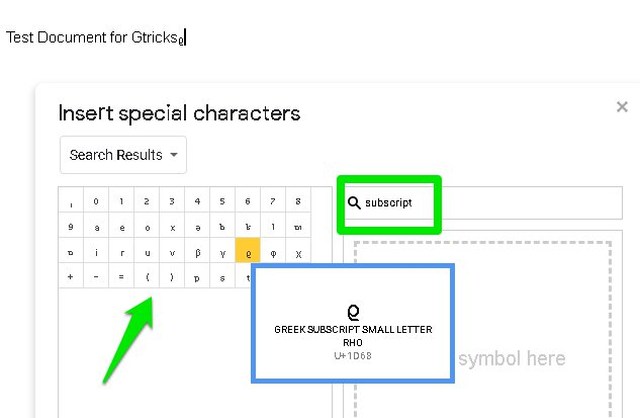 3 Ways To Do Superscript and Subscript in Google Docs . It is very important while writing technical papers and/or professional documents, in writing chemical and mathematical equations, etc.
 How to Superscript & Subscript in Google Docs, Slides & Word . You can make your own copy to your google drive, and then copy/paste the subscripts/superscripts you need.
 How to do Subscript in Google Docs [Superscript Also . Some shortcuts might not work for all languages or keyboards.
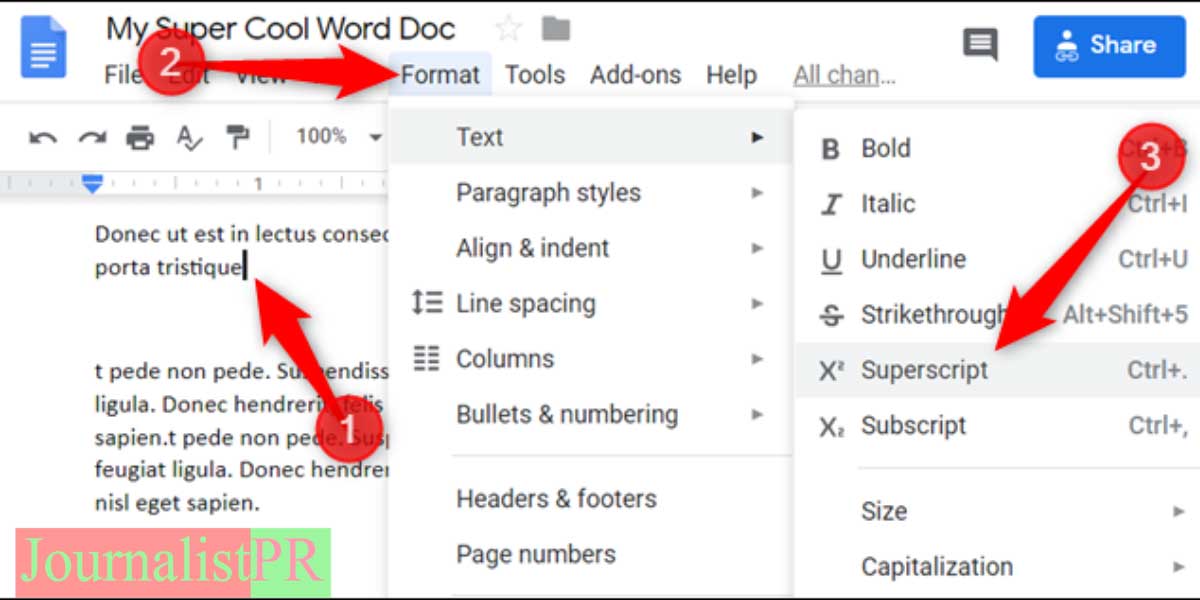 How to Insert Subscript and Superscript Text in Google . Adding subscripts and superscripts is essential when typing various types of documents.
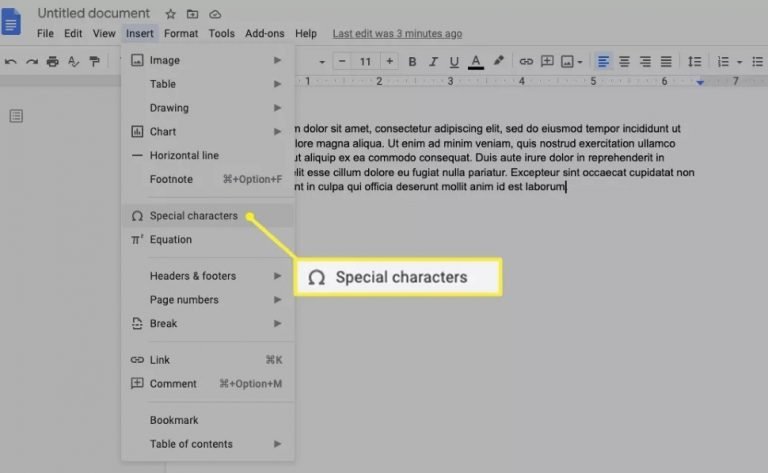 How to Do Subscripts and Superscripts in Google Docs . Like the web version, the google docs mobile app also allows you to format text as superscript or subscript.
 How to Superscript in Google Docs (from a PC or the Google . In the google docs document, select the text character, number or symbol to which you want to apply superscript.
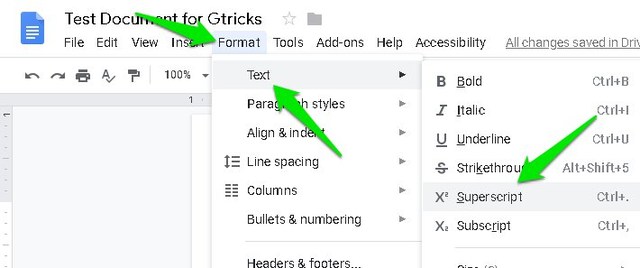 3 Ways To Do Superscript and Subscript in Google Docs . Use keyboard shortcuts in google docs to navigate, format, and edit.

Comments
Post a Comment