7 Latest Illustrations How To - Free illustrations, backgrounds and illustrator templates in eps and ai formats. How to use illustration in a sentence. Text on cartoon illustrations . Transform photos into watercolors with a free. Illustrations how to 7 Successful Illustrations How To . Illustrations images photos vector graphics illustrations videos. On pixiv how to draw page, you can easily find drawing tutorials, step by step drawings, textures and other materials. There are many types of. Illustrations how to 500+ free illustrations & animations. How to make flat illustrations original and add personal style to them today, many designers try their creativity in flat illustration. Suggestive illustrations on the gospel of john: Illustrations how to The meaning of illustration is something that serves to illustrate. Adobe.com has been visited by 100k+ users in the past month Attract more visitors and increase your conversion rate with custom made illustrati...
8 Unbelievable How To Get Photos From Iphone Onto Pc - Press import > select from a usb device and wait for a while. You just need to open the dcim folder in your iphone on your computer, select the videos you want and move them to your pc.
 How to Download Photos from Your iPhone to a Computer . If you're using lenovo laptop, this guide comes for you to transfer photos from iphone to lenovo laptop.
How to get photos from iphone onto pc
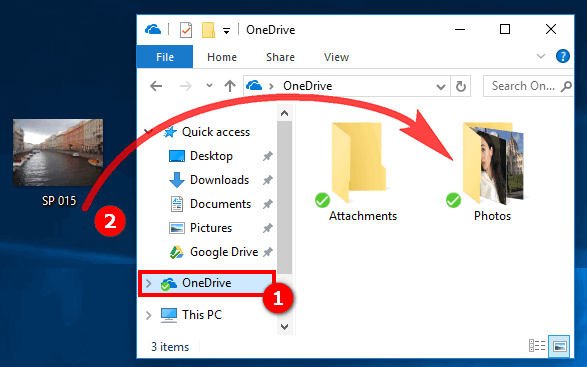
13 Undercover How To Get Photos From Iphone Onto Pc. The migration process through microsoft photos could get. Double click on the internal storage in the right pane to open it. On the pc, open photos app from start menu, desktop, or taskbar. How to get photos from iphone onto pc
Gemini photos will find and categorize all the photos you don’t need and help you delete them in a few taps. On your pc, select the start button and then select photos to open the photos app. In our case, simply check the tiny box for contacts and click next button to let the software copy iphone contacts onto windows laptop & pc. How to get photos from iphone onto pc
Connect your iphone 12 to the pc via a working cable. Step 1 connect iphone 7/ 7 plus to your computer with a usb cable. So get ready beforehand and download gemini photos onto your iphone. How to get photos from iphone onto pc
How to get photos off iphone using windows explorer how to transfer photos from iphone to pc Click on import items to transfer iphone photos to a windows 10 computer. Besides, since photos in iphones are easy to be lost or deleted accidentally, it's a nice choice to backup iphone photos to pc. How to get photos from iphone onto pc
You can use photos app on win 8 to get photos from iphone to win 8. When the backup process completes, you will get a notification window that shows congratulations. Under computer for windows 7 or this pc for windows 8/10, you should see your iphone as a drive. How to get photos from iphone onto pc
Click import settings to set the destination or other options. Learn how to take photos and videos from your apple iphone and bring them to your windows 10 desktop or laptop. Click through import > from a usb device. How to get photos from iphone onto pc
In this post, you’ll find 8 most popular ways to transfer iphone photos to pc without itunes, and thus clean up space on your device: In this video, i walk through three different. Your iphone automatically converts the photos to.jpeg files when you import them to a pc. How to get photos from iphone onto pc
Turn your phone on and unlock it. Connect your iphone to the target computer. Connect your iphone to dell pc and run the photos app. How to get photos from iphone onto pc
The four methods below are also compatible with any windows pc. Connect your iphone with windows pc. Your pc can’t find the device if the device is locked. How to get photos from iphone onto pc
Connect your iphone to pc with a usb cable. Transfer photos from an iphone to your pc. Once connected, unlock your iphone and tap on trust button on it when you get a relevant prompt on the phone screen. How to get photos from iphone onto pc
Besides, it also allows you to collect, view, and edit your photos/videos in the photo gallery as well as onedrive. Step 2 when the autoplay window pops out, click import pictures and videos using windows. The photos app can be opened by selecting the start button and then selecting photos. How to get photos from iphone onto pc
For example, if you accidentally transferred the same photos twice or transferred some pictures you already have on your iphone, here’s how you find and delete those duplicates: Here is how to get photos from pc to iphone: You will need to connect your iphone to a pc via a usb cable so that files can be transferred. How to get photos from iphone onto pc
Connect your iphone to your pc windows 8/10 > open photos app > scroll down to the bottom > click import. Choose the image (s) that you want to import into the machine. Enter your passcode on the iphone if asked. How to get photos from iphone onto pc
Step 3 select the photos and click import, and you are also able to type a tag name in the tag these pictures (optional) box. If you select “keep originals” instead, your iphone will give you the original.heic files. Importing items is as simple as picking them and selecting where to save them. How to get photos from iphone onto pc
On your iphone, head to settings > photos, scroll down, and then tap “automatic” under transfer to mac or pc. I use the free google picasa software on my work pc to import photos via a wired connection. When you import videos from your ios or ipados device to your pc, some of them may appear the wrong way up in the windows photos app. How to get photos from iphone onto pc
First, connect your iphone to a pc with a usb cable that can transfer files. Click the send to pc button after selecting photos you want to transfer. If you haven’t done so already, download and install copytrans photo: How to get photos from iphone onto pc
You can import data from a usb device by selecting import > from a usb device. It views the iphone as a camera, and allows you to browse the photos on the phone and import the photos you want. Choose the pictures you want to import. How to get photos from iphone onto pc
If prompted to trust pc, press “trust”. You will see your iphone photos on the left and your pc pictures on the right: How to get iphone photos onto my dell computer? How to get photos from iphone onto pc
 How to Get iOS 14 on Your iPhone . How to get iphone photos onto my dell computer?
 How To Get Pictures Off Computer Onto Iphone PictureMeta . You will see your iphone photos on the left and your pc pictures on the right:

 How to Transfer Photos From Your iPhone to a PC Techwalla . Choose the pictures you want to import.
 How to Transfer Photos from Computer to iPhone 6 iMobie . It views the iphone as a camera, and allows you to browse the photos on the phone and import the photos you want.
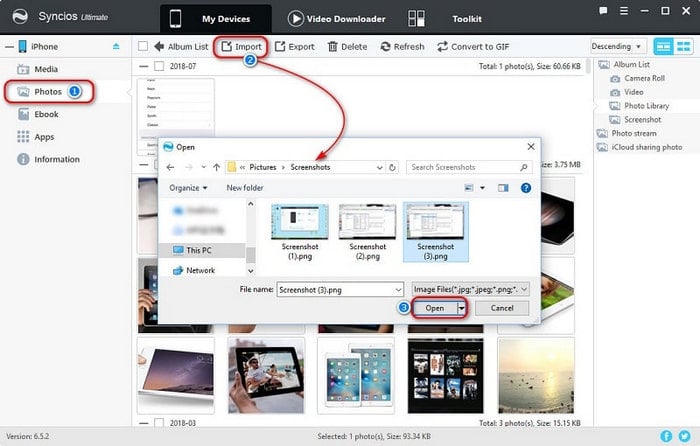 PC to iPhone Transfer Tool Transfer Photos from Computer . You can import data from a usb device by selecting import > from a usb device.
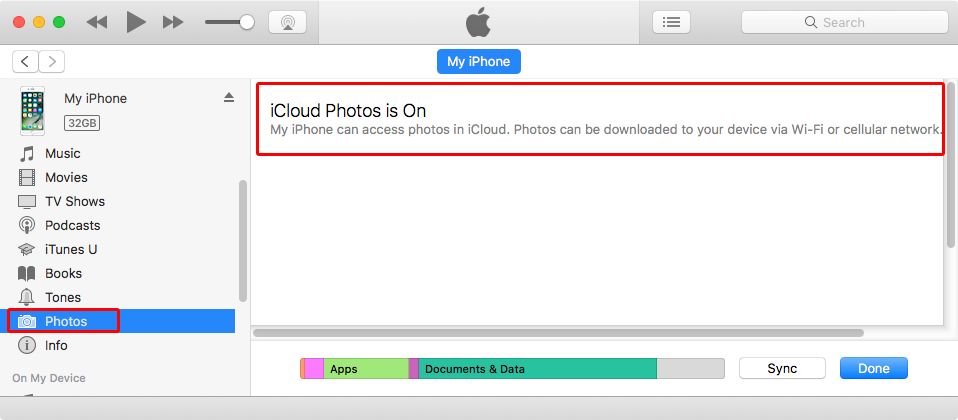 How to Transfer Photos from Computer to iPhone? 4 Easy Ways . If you haven’t done so already, download and install copytrans photo:
 How to Transfer Photos From Your iPhone to a PC Techwalla . Click the send to pc button after selecting photos you want to transfer.
 My Photo Stream FAQ Apple Support . First, connect your iphone to a pc with a usb cable that can transfer files.

Comments
Post a Comment