7 Latest Illustrations How To - Free illustrations, backgrounds and illustrator templates in eps and ai formats. How to use illustration in a sentence. Text on cartoon illustrations . Transform photos into watercolors with a free. Illustrations how to 7 Successful Illustrations How To . Illustrations images photos vector graphics illustrations videos. On pixiv how to draw page, you can easily find drawing tutorials, step by step drawings, textures and other materials. There are many types of. Illustrations how to 500+ free illustrations & animations. How to make flat illustrations original and add personal style to them today, many designers try their creativity in flat illustration. Suggestive illustrations on the gospel of john: Illustrations how to The meaning of illustration is something that serves to illustrate. Adobe.com has been visited by 100k+ users in the past month Attract more visitors and increase your conversion rate with custom made illustrati...
8 Approved How To Transfer Songs From Computer To Iphone - This method is recommended if you only want to transfer For the purpose of transferring music itunes library to iphone for a sync, choose sync itunes to device form the given tabs.
 How To Download Songs From Windows Media Player To Iphone . Start the software, and connect your iphone to computer.
How to transfer songs from computer to iphone

7 Quickly How To Transfer Songs From Computer To Iphone. Transfer songs from computer to your iphone with itunes after connecting your iphone to computer with its usb cable, you'll find a cell phone icon besides content menu on the top. As long as your internet connection is stable and fast, the songs will be transferred within a short time. Steps to transfer music to iphone without itunes wirelessly: How to transfer songs from computer to iphone
9.0.5 step 5.go to iphone’s music appplay your music 10 how to put mp3 on iphone using airdrop 10.1 to put an mp3 on iphone using airdrop, do the following: Then, open itunes on the computer. How to transfer songs from computer to iphone 11 with email another way to put music on iphone 11/12/13 from computer without usb cable is using email. How to transfer songs from computer to iphone
On your computer, open a browser and enter the url in evermusic app. The process of moving is safe, fast and you do not have to worry about harming the devices. It isn’t as simple as they make it sound. How to transfer songs from computer to iphone
Click itunes library at the bottom. I have explained both the methods, ho. Then select the songs to transfer from pc to iphone 6/7/8/x or iphone xr/xs/xs max. How to transfer songs from computer to iphone
Connect your iphone 12 to your computer using a lightning cable. Leawo itransfer , one of the best alternatives to itunes, supports to transfer files among ios devices, itunes and pcs without the sync of itunes, and it enables users to transfer. Click the cell phone icon and choose music in the settings menu. How to transfer songs from computer to iphone
Transfer overall music files from iphone to computer, or upload music to iphone from pc without itunes. Iphone users often ask how to copy songs from their computer to the iphone. On your iphone, go to app store to download and evermusic app. How to transfer songs from computer to iphone
Learn how to transfer music from computer to iphone in this video. Connect the iphone to the computer using the usb cable. To learn how to transfer music from iphone to computer directly, you can follow these steps: How to transfer songs from computer to iphone
Here's how to sync music from itunes to iphone with the help of the tool: Apple makes a lot of money from itunes sales, so they clarified that song transfer would not be easy for users. There are two different ways to add music to iphone. How to transfer songs from computer to iphone
How to transfer music from your dell computer to iphone through itunes if you have purchased apple songs, the best way to transfer the music from the computer to the iphone is through itunes. Select summary in the left pane, then select manually manage music and videos. After you download music from computer to iphone, you can listen to the new added songs on your iphone. How to transfer songs from computer to iphone
Click the manage tab, and then go to the music folder and select import. Transfer music from computer to iphone via email to transfer music from computer to iphone wirelessly, you can also choose to email selected songs to yourself. To download music to iphone with itunes: How to transfer songs from computer to iphone
Select the music files you want to save to your iphone 12 and tap open to transfer. Click “import” button and choose whether to import files or a folder. After running the toolkit, go to its phone manager service. How to transfer songs from computer to iphone
If the music you want to download to your iphone is not in the itunes library, go to file > add file. Not only transferring music from computer to iphone, fonepaw ios transfer can be your best music manager whether you want to transfer music or more apple files from pc to iphone, from iphone to pc, or even iphone to itunes. It also moves data like photos, videos, notes, contacts, sms, books, safari bookmarks, voice memos, podcasts, playlists, etc. How to transfer songs from computer to iphone
On web, choose “music” icon on the left side of the iphone information. Transfer music from iphone to computer. How to transfer songs from computer to iphone without itunes to be honest, many users are looking for data transfer tools other than itunes these days. How to transfer songs from computer to iphone
Make sure you have installed the latest version of itunes on your computer. Once done, you can check and play the music on your iphone 12. Transfer music manually from itunes: How to transfer songs from computer to iphone
You can email your wanted songs to yourself. 11 how to transfer mp3 to iphone using itunes 12 how to add 13 How to transfer songs from computer to iphone
 How To Transfer Music From iPod iPhone iPad to Computer . 11 how to transfer mp3 to iphone using itunes 12 how to add 13
 Best Free Ways to Transfer Music from iPhone to Computer . You can email your wanted songs to yourself.
 How to Transfer Music from Old iPod to iPhone in Minutes . Transfer music manually from itunes:
 How Can I Copy Music from iPhone to Computer without . Once done, you can check and play the music on your iphone 12.
How To Remove Songs From Your Iphone On Itunes . Make sure you have installed the latest version of itunes on your computer.
 [Easy&Quick]How to Transfer Music from CD to iPhone on Mac . How to transfer songs from computer to iphone without itunes to be honest, many users are looking for data transfer tools other than itunes these days.

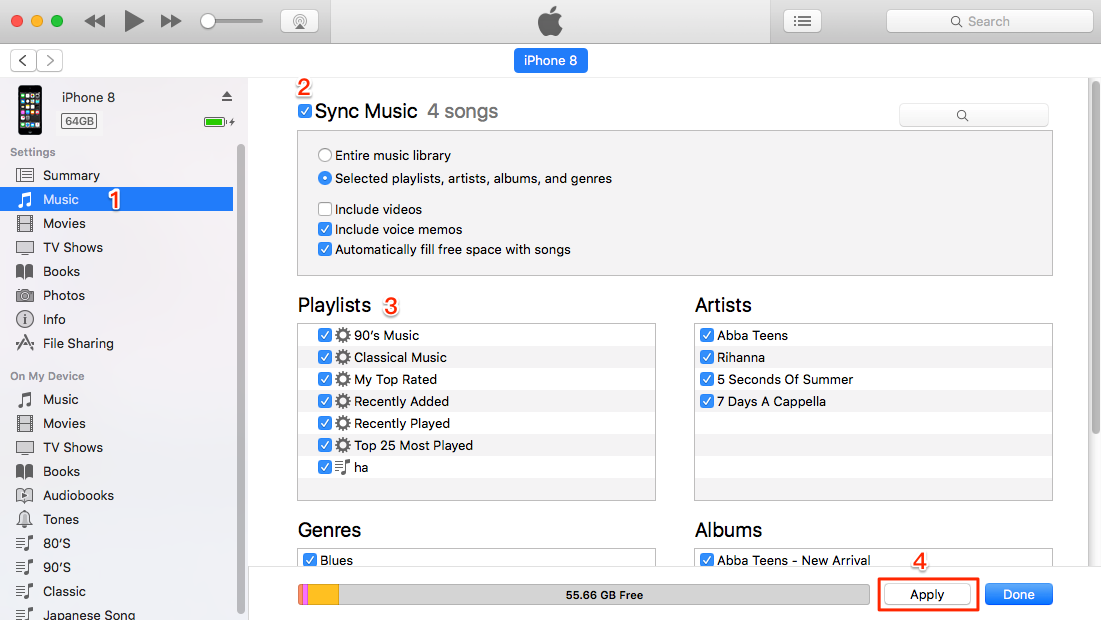 [Easy&Quick]How to Transfer Music from CD to iPhone on Mac . On web, choose “music” icon on the left side of the iphone information.
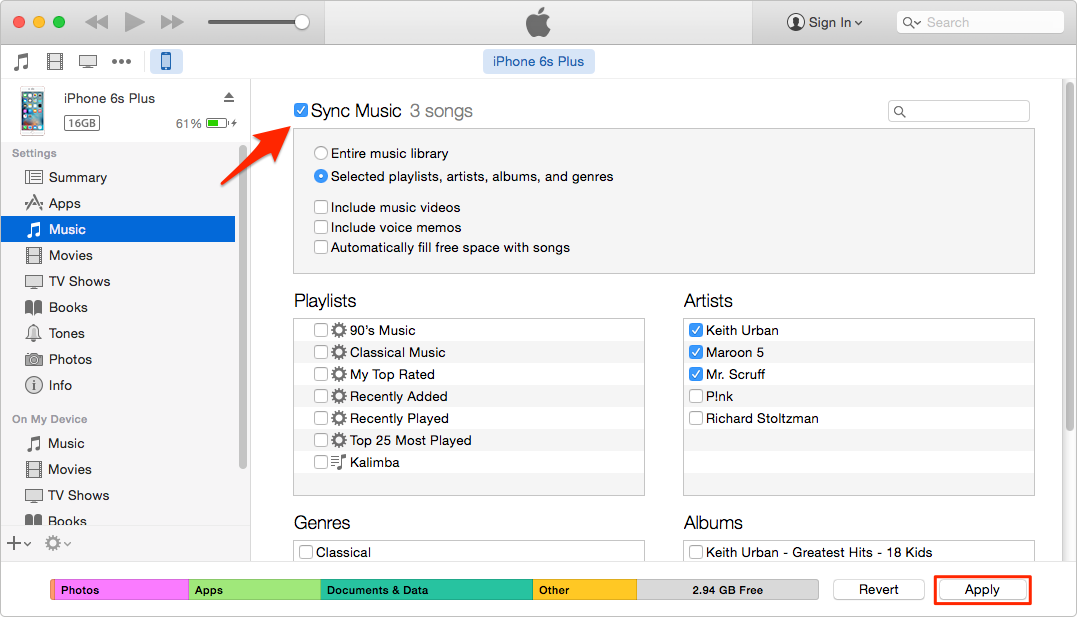 How To Download Songs On Iphone Without Computer . It also moves data like photos, videos, notes, contacts, sms, books, safari bookmarks, voice memos, podcasts, playlists, etc.

Comments
Post a Comment